


A new Android malware campaign is using the Hugging Face platform as a repository for thousands of variations of an APK payload that collects credentials for popular financial and payment services.
Hugging Face is a popular platform that hosts and distributes artificial intelligence (AI), natural language processing (NLP), and machine learning (ML) models, datasets, and applications.
It is considered a trusted platform unlikely to trigger security warnings, but bad actors have abused it in the past to host malicious AI models.

The recent campaign discovered by researchers at Romanian cybersecurity company Bitdefender leverages the platform to distribute Android malware.
The attack begins with victims being lured to install a dropper app called TrustBastion, which uses scareware-style ads claiming that the target’s device is infected. The malicious app is disguised as a security tool, claiming to detect threats such as scams, fraudulent SMS messages, phishing attempts, and malware.
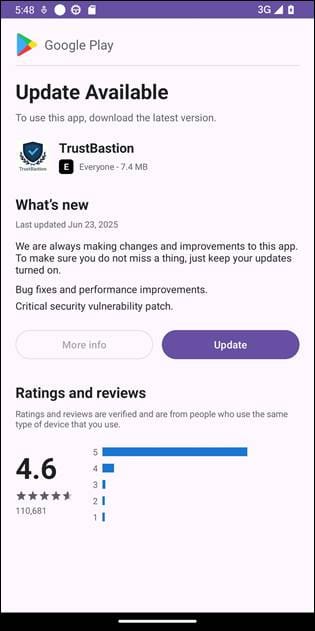
Immediately after installation, TrustBastion shows a mandatory update alert with visual elements that mimic Google Play.
Source: Bitdefender
Instead of directly serving malware, the dropper contacts a server linked to trustbastion[.]com, which returns a redirect to a Hugging Face dataset repository hosting the malicious APK. The final payload is downloaded from Hugging Face infrastructure and delivered via its content distribution network (CDN).
To evade detection, the threat actor uses server-side polymorphism that generates new payload variants every 15 minutes, Bitdefender says.
“At the time of investigation, the repository was approximately 29 days old and had accumulated more than 6,000 commits.”
During analysis, the payload-serving repository was taken down, but the operation resurfaced under a new name, ‘Premium Club,’ which used new icons while retaining the same malicious code.
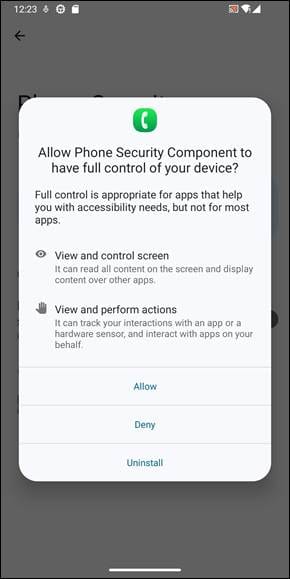
The main payload, which lacks a name, is a remote access tool that aggressively exploits Android’s Accessibility Services, presenting the request as necessary for security reasons.
Source: Bitdefender
This gives the malware the ability to serve screen overlays, capture the user’s screen, perform swipes, block uninstallation attempts, and more.
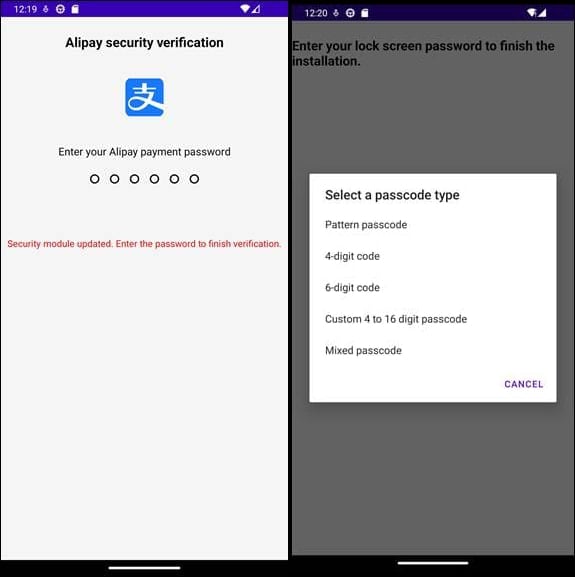
In this case, Bitdefender says the malware monitors user activity and captures screenshots, exfiltrating everything to its operators. The malware also displays fake login interfaces impersonating financial services such as Alipay and WeChat to steal credentials, and also attempts to steal the lock screen code.
Source: Bitdefender
The malware remains connected at all times to the command-and-control (C2) server, which receives the stolen data, sends command execution instructions, configuration updates, and also pushes fake in-app content to make TrustBastion appear legitimate.
Bitdefender informed Hugging Face about the threat actor’s repository, and the service removed the datasets containing the malware. Researchers also published a set of indicators of compromise for the dropper, the network, and malicious packages.
Android users should avoid downloading apps from third-party app stores or installing them manually. They should also review the permissions an app requests and ensure all of them are necessary for the app’s intended functionality.
Update 1/31 – A Google spokesperson sent the following comment regarding Bitdefender’s findings:
“Based on our current detection, no apps containing this malware are found on Google Play. Android users are automatically protected against known versions of this malware by Google Play Protect, which is on by default on Android devices with Google Play Services. Google Play Protect can warn users or block apps known to exhibit malicious behavior, even when those apps come from sources outside of Play.” – A Google Spokesperson
.ia_ad {
background-color: #f0f6ff;
width: 95%;
max-width: 800px;
margin: 15px auto;
border-radius: 8px;
border: 1px solid #d6ddee;
display: flex;
align-items: stretch;
padding: 0;
overflow: hidden;
}
.ia_lef {
flex: 1;
max-width: 200px;
height: auto;
display: flex;
align-items: stretch;
}
.ia_lef a {
display: flex;
width: 100%;
height: 100%;
}
.ia_lef a img {
width: 100%;
height: 100%;
border-radius: 8px 0 0 8px;
margin: 0;
display: block;
}
.ia_rig {
flex: 2;
padding: 10px;
display: flex;
flex-direction: column;
justify-content: center;
}
.ia_rig h2 {
font-size: 17px !important;
font-weight: 700;
color: #333;
line-height: 1.4;
font-family: Georgia, “Times New Roman”, Times, serif;
margin: 0 0 14px 0;
}
.ia_rig p {
font-weight: bold;
font-size: 14px;
margin: 0 0 clamp(6px, 2vw, 14px) 0;
}
.ia_button {
background-color: #FFF;
border: 1px solid #3b59aa;
color: black;
text-align: center;
text-decoration: none;
border-radius: 8px;
display: inline-block;
font-size: 16px;
font-weight: bold;
cursor: pointer;
padding: 10px 20px;
width: fit-content;
}
.ia_button a {
text-decoration: none;
color: inherit;
display: block;
}
@media (max-width: 600px) {
.ia_ad {
flex-direction: column;
align-items: center;
}
.ia_lef {
max-width: 100%;
}
.ia_lef a img {
border-radius: 8px 8px 0 0;
}
.ia_rig {
padding: 15px;
width: 100%;
}
.ia_button {
width: 100%;
margin: 0px auto;
}
}

The future of IT infrastructure is here
Modern IT infrastructure moves faster than manual workflows can handle.
In this new Tines guide, learn how your team can reduce hidden manual delays, improve reliability through automated response, and build and scale intelligent workflows on top of tools you already use.


Comments